

Radio Singapore - Fm radio
singapore fm radio is a free radio app with more than 1000 online radio stations.
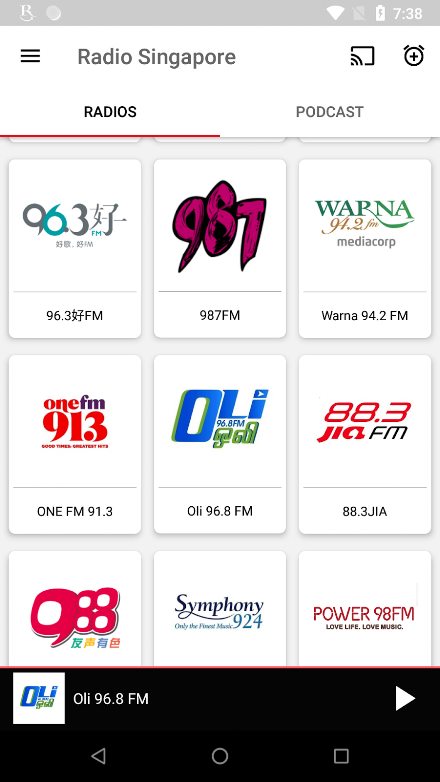
FM radio Singapore gives you the Wonderfull user interface with easy navigation.Features:* Sleep timer.* Wake-Up Radio Alarm.* Instant/Quick search option.* Bluetooth controls (change your favorite station from headphones/Bluetooth...)* Top Podcasts (Daily talks, Daily news, Jokes) from live UK channels.* Podcast Download Option.* Live Radio stations from all over the world.* Favorites tab to add your favorite stations.* Change your favorite Radio FM Online from the notification.FM radio Singapore stations list:Mediacorp Radio: Yes 933, Class 95, 987FM, Love 972, Gold 90.5, Oli 96.8, Warna 94.2, Ria 89.7, Capital 958, Singapore radio 958 , Symphony 92.4 and CNA 938NowSPH Radio: Kiss 92, UFM 1003, One FM, 96.3好FM - 963 Hao FM and MONEY FM 89.3So Drama!
Entertainment: Power 98 and Jia FM98.7fm SingaporeOli FM SingaporeSingapore Tamil radioSingapore radio 933988友声有色Hitz FM Radio973FMSingapore English radioAsia Expat RadioQuran RadioBBC radio Singaporeand many more Singapore FM and internet radio stations.Listen to all your favorite Singapore radio stations & podcasts!
About Radio Singapore - Fm radio
- Package name (App ID)
- com.radiosingapore.sgradio.singaporefm
- Available on
- Google Play
- Price
- Free
- Developer
- Radio world
Looking for the Radio Singapore - Fm radio APK?
The safest way to get Radio Singapore - Fm radio (com.radiosingapore.sgradio.singaporefm) on your Android device is to install it directly from Google Play — you'll always get the latest official version, automatic updates, and no risk of modified or infected APK files from third-party sites.

Financial Tools
Manage your finances and track your expenses easily.
Food & Dining
Discover recipes and order food from your favorite restaurants.
News & Updates
Stay informed with the latest news and updates.
See Radio Singapore - Fm radio in Action


Frequently Asked Questions
Is Radio Singapore - Fm radio free?
Yes, Radio Singapore - Fm radio is free to download and install on Android through Google Play.
How do I install Radio Singapore - Fm radio on Android?
Open Google Play on your Android phone or tablet, search for Radio Singapore - Fm radio by Radio world or tap the Google Play button on this page, then tap Install. The app downloads and installs automatically.
What is com.radiosingapore.sgradio.singaporefm?
com.radiosingapore.sgradio.singaporefm is the App ID (package name) of Radio Singapore - Fm radio on Google Play. Every Android app has a unique package name, and it is the safest way to verify you are installing the official app.
Is Radio Singapore - Fm radio safe to download?
Installing Radio Singapore - Fm radio from Google Play is the safest option: you get the official version published by Radio world, verified by Google Play Protect, with automatic updates. Avoid APK files from unofficial third-party sites.

Get Radio Singapore - Fm radio Today
Radio Singapore - Fm radio for Android — free download on Google Play.
Compatible with Android phones and tablets — available on Google Play.
Ask AI about this app
Get instant answers about features, tips and more from popular AI assistants.